
1C3D TurboCopy: Fast, Verified File Copying for Windows
1C3D TurboCopy is a free Windows app for copying or moving big folders without losing a file. It copies several files at once, checks every copy against the original, keeps going when a file fails, and even waits for a USB drive that drops out halfway. It's built for the jobs Windows Explorer handles badly: backing up years of STL files, moving a print farm's archive to a new drive, or copying a 200 GB project folder to a NAS.
Download 1C3D TurboCopy for Windows (11 MB, free)
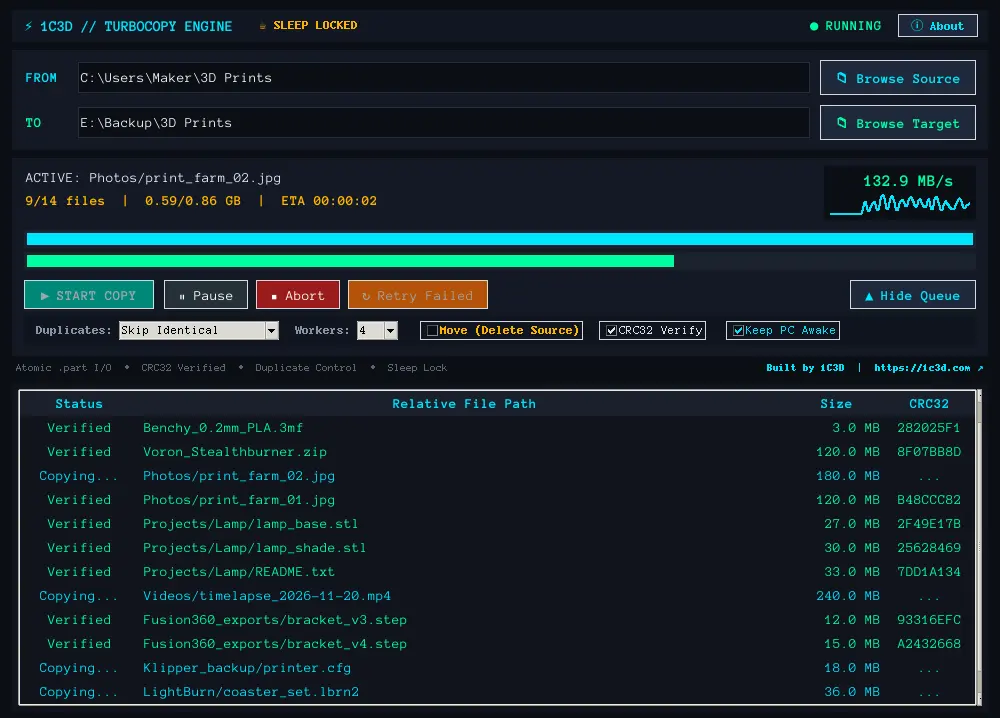
Copying a 3D prints folder to a backup drive: speed graph, two progress bars, and every file checked as it lands.
What it does
- Copies several files at once. Pick 1, 2, 4 or 8 workers. More workers help with lots of small files and fast SSDs; fewer are better for a single slow USB stick.
- Checks every copy. With CRC32 Verify on (it is by default), TurboCopy reads each finished copy back and compares its checksum with the original. The checksum shows next to each file in the queue.
- Never leaves half-files behind. Each file is written as a temporary
.partfile and only renamed to its real name once it's complete and verified. If the power goes out or you abort, you won't find a broken file with the right name. - Moves safely. Tick Move (Delete Source) and verification is switched on automatically: an original is only deleted after its copy has passed the check. Empty folders left behind are cleaned up when the move finishes with no errors.
- Keeps going when something fails. A file that fails is retried up to five times with growing pauses in between. Anything that still fails is marked in red, and Retry Failed runs just those files again.
- Waits for unplugged drives. If the destination drive disappears (a loose USB cable, a drive that went to sleep), the file shows USB Wait and the copy picks up again when the drive comes back.
- Keeps your PC awake. With Keep PC Awake on, Windows won't go to sleep in the middle of an overnight copy. The setting is released when the job ends.
- Handles long paths. Deep folder trees with paths over Windows' old 260-character limit copy fine.
- Keeps dates. Copies keep the original file's modified date, so sorting by date still works afterwards.
- Pause, resume, abort. Pause a big job to free up the drive, then carry on. Abort stops cleanly and removes any unfinished
.partfiles.
Duplicate handling
Pick what happens when a file already exists in the destination:
- Skip Identical (default): skips files that already exist with the same size and modified date. Great for re-running a backup, since only new and changed files are copied.
- Overwrite All: replaces whatever is in the destination.
- Rename (Keep Both): keeps the existing file and saves the new one as
file (1).stl,file (2).stland so on. - Dedupe (CRC32): compares file contents, not names. A file whose exact contents are already in the destination, or were already copied earlier in the same job, is skipped. Handy for merging several messy download folders into one without piling up copies of the same model.
How to use it
- Download and unzip. The download is a 7z archive with a single file,
1C3D-TurboCopy.exe. Windows 11 can open 7z files from File Explorer; on Windows 10 use the free 7-Zip. There's nothing to install. Run the .exe from wherever you put it. - Pick your folders. Click Browse Source and Browse Target, or drag a folder from File Explorer straight onto either box.
- Choose your options. Duplicates, workers, Move or Copy, Verify and Keep PC Awake.
- Click Start Copy. Watch the live speed graph and time remaining, or click Show Queue to see every file's status.
Good to know
- Windows only. It's made for Windows 10 and 11.
- Windows may warn you the first time. The app isn't signed with a paid code-signing certificate, so SmartScreen may say "Windows protected your PC". Click More info, then Run anyway. Some antivirus programs are also wary of new, unsigned apps until enough people have run them.
- Verify costs some speed. Checking each copy means reading it back, so a verified copy takes longer than a plain one. For a backup you care about, it's worth it.
- Skip Identical plus Move: in Move mode, a file that's skipped because an identical-looking copy (same size and date) is already in the destination is removed from the source, since a copy already exists. Use Dedupe (CRC32) if you want contents compared before anything is deleted.
Why I built it
Moving a few hundred gigabytes of models, slicer projects and timelapses between drives is part of life with a 3D printer, and Explorer's copy dialog gives up on the first problem it hits. TurboCopy is the tool I wanted for that: fast, checked, and safe to leave running overnight. It's free. If it saves you a headache, 1c3d Pro helps pay for the site and tools like this.
Download 1C3D TurboCopy · Questions or ideas? Post them in the forum.